

Setting up a NFS server on Gentoo doesn’t have to be difficult. Here I will explain how to setup a basic NFS server in just a few steps.
The fist step is to become root.
$ su -
Your Gentoo kernel must be compiled with support for both NFS server and client. You can check for this in a couple ways.
If you manually built your kernel you can do the following to check for support.
# cd /usr/src/linux
# make menuconfig
The following options should be enabled in the kernel.
File Systems —>
Network File Systems —>
<*> NFS file system support
[*] Provide NFSv3 client support
<*> NFS server support
[*] Provide NFSv3 server support
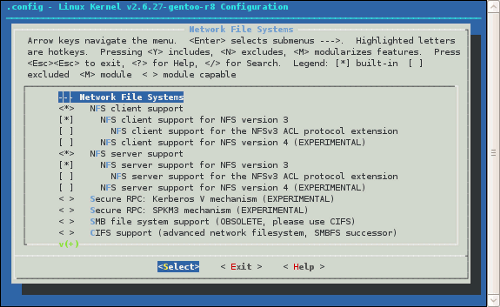
It should look similar to this.
Alternatively you may be able to check your configuration settings in /proc/config.gz.
# zcat /proc/config.gz | grep NFS
Here are the important lines to look for.
...
#
# Network File Systems
#
CONFIG_NFS_FS=y
CONFIG_NFS_V3=y
# CONFIG_NFS_V4 is not set
# CONFIG_NFS_DIRECTIO is not set
CONFIG_NFSD=y
CONFIG_NFSD_V3=y
# CONFIG_NFSD_V4 is not set
# CONFIG_NFSD_TCP is not set
...
If your configuration lacks these options you will need to rebuild your kernel.
Once you verified your kernel has NFS support go ahead and emerge the nfs-utils package. This package contains all the user-space programs to setup NFS.
# emerge nfs-utils
You should now edit /etc/exports which tells NFS which filesystems should be shared.
# vim /etc/exports
Here is a basic entry example. Here the /mnt/storage directory will be shared to all computers on 192.168.1.* network. The share options will allow for secure read and write access to the NFS volume.
/mnt/storage 192.168.1.0/24(rw,sync,no_subtree_check)
Now start the NFS service.
# /etc/init.d/nfs start
Congratulations you should now have a working NFS server, but there are still a couple things to do.
Add this service to your default run level. This will automatically start the service every time the system boots.
# rc-update add nfs default
The showmount command can be used to check which NFS volumes are exported.
# showmount -e [host]
If you make any changes to the /etc/exports file you need to reload the NFS service for these changes to take effect.
# /etc/init.d/nfs reload