
Installing Ubuntu 9.10 on the Dell Zino HD

The Dell Inspiron Zino HD is the perfect machine if you are looking to build an Ubuntu Linux based HTPC. At the time of this post the Zino can be purchased with either Windows 7 or Ubuntu linux 9.04. I decided to go with Windows 7 and install Ubuntu 9.10 64-bit karmic on my own in a dual boot configuration. This article will cover all the steps necessary to get Ubuntu up and running.
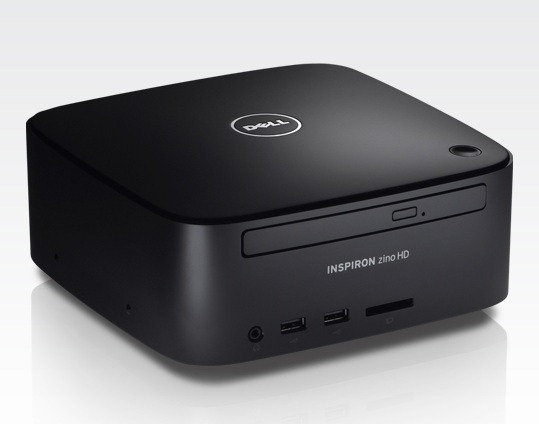
dell_zino

The easiest way to setup a dual boot configuration is to reinstall Windows 7 first with the included OS DVD and then Ubuntu second. When installing Windows 7 make sure to leave space for your Ubuntu installation. Repartition the drive so that Windows 7 only uses a small chuck and leave the rest of the space unallocated. The good thing about reinstalling Windows is that it gets rid of all the extra 3rd party junk that comes preinstalled.

You can install Ubuntu through the HDMI but on some TVs the HDMI port may display incorrectly until the ATI drivers are correctly installed. If this occurs to you switch over the the VGA port until you have completed the installation.

The only other pitfall of this installation is that the default Ubuntu installation doesn’t recognize the wireless card (in my build it was the Broadcom wireless b/g card). All this means is that you need to have the wired ethernet connection until you update the system and download the appropriate wireless driver.

Once you have completed the initial installation and made sure you have a working network connection you should update your system.

$ sudo apt-get update && sudo apt-get -y upgrade

Next you need to find and install your hardware drivers. Go here:
System -> Administration -> Hardware Drivers

It should find the Broadcom STA wireless driver for your wireless, and the FGLRX ATI/AMD driver for your video card. Download and activate both of them. You should now be able to connect with wireless and use the HDMI port if you experienced display issues with it during the installation.

If your display resolution if incorrect. Go here:
System -> Administration -> Display

Configure your sound to work over HDMI. Go here:
System -> Administration -> Sound

In the Output tab select HDMI. You can go to the Sound Effects tab and select a sound to test that it works.

You should now a fully functional system up and running with Ubuntu, but you may want to install some packages that will make your make your life easier. Here are my suggestions:

ubuntu-restricted-formats
ssh
nfs-common
sshfs
vim

mythtv
boxee
xbmc

Enjoy your new Zino HTPC!


ubuntu
, , , , , , , , , , , , , , , , , , ,
9 Comments

Related posts:

  1. Install Boxee on 64-bit Ubuntu 9.10 Karmic
    Installing Boxee turns your computer into an incredable HTPC but the installation process is not...
  2. Setup PS3 controller over bluetooth on Ubuntu
    The PS3 Sixaxis and DualShock3 bluetooth controllers are a great for gaming on your PS3...
  3. Fix blue tinted video in Ubuntu
    A strange issue has been identified in Ubuntu where video takes on a blue colored...


If you enjoyed this post, please consider to leave a comment or subscribe to the feed and get future articles delivered to your feed reader.

Comments

Comments (9)

I am curious to see where the Zino can be ordered with Ubuntu. Looking at the Dell website I can only find it with Vista and/or Windows 7. Chatting with a sales agent they don’t seem to offer Ubuntu. I am interested in purchasing one but do not want to pay the Microsoft tax :-(

Heiko

They previously had one for $229 that shipped with Ubuntu preinstalled but that looks to be gone now.

Hi,

thanks for the notes - I’ve been thinking about one of these myself.

I was wondering whether your zino HD has the “standard” radeon mobility 3200 or the 4330 option? Have you tried playing back HD video of any sort using it?

Cheers, and happy new year.

Simon

I had mine built with the ATI 4330 and Neo X2 6850e (dual core 1.8 GHz). So far it has managed to play anything I have thrown at it.

The only thing that seems to max out the system is full screen HD flash videos. Sor far I have been very impressed with the power of this little box.

Thanks very much for that - that’s what I was hoping. I think I’m going to go and order one (:

Have you looked at the adobe flash 10.1 beta? It’s supposed to take advantage of hardware acceleration for your graphics chipset (see: http://www.liliputing.com/2009/11/adobe-flash-player-10-1-beta-with-gpu-acceleration-arrives.html for some details) - should significantly reduce CPU utilisation.

Best wishes,

Simon

The Flash 10.1 beta does indeed support hardware acceleration, and it supports it for both of the ATI graphics chips available for the Zino (4330 and 3200).

Unfortunately it is limited to the Windows version only at this point. Hopefully we will get support in the Linux community in the near future.

Really? Adobe seems to have a download for 10.1 beta 2 on their site:

http://labs.adobe.com/downloads/flashplayer10.html

Maybe it was just added in the last 5 days since your post. I’d be interested to know if someone has tried the latest flash beta on the Zino with Ubuntu (specifically on the cheaper HD3200 card).

I’ve got a Dell Zino HD with AMD X2 3250e CPU. For me the CPU frequency scaling don’t work. What is about your machine?
Do you see cpufreq for
ls /sys/devices/system/cpu/cpu0/

Thanks- I got wirelss to work, however the ATI driver tells me I hold broken packages. Furthermore I have no sound on the rear jack - any ideas?

Trackbacks (0)

No trackbacks yet
Leave a comment

(required)

(required)