

It is often necessary to have the ability to SSH between your Linux Host and your Guest virtual machines. In VirtualBox you can do this by simply configuring a second network interface on the Guest. This type of setup will not only allow SSH sessions between Host and Guest, but also between separate Guests themselves.
First off shutdown your Guest VM so that you can add a second network interface. By default you should have one interface already which is using NAT. Leave this alone as it provides access to the internet. Select the tab “Adapter 2″ and change “attached to” to “Host-only Adapter”.
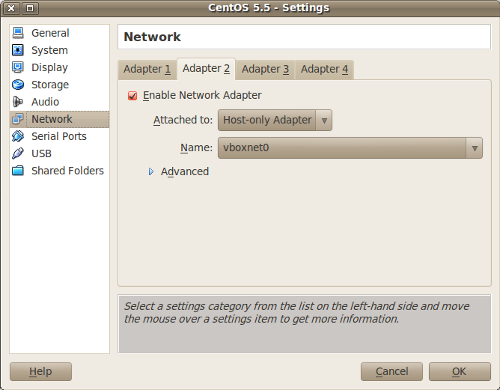
Now boot up your Guest and pull up a terminal. Run ifconfig to see what base address eth1 has been assigned. You can use this address as a base to assign static IP addresses for each Guest VM. In this case inet addr:192.168.56.101 is the base IP address.
$ sudo ifconfig eth1
Link encap:Ethernet  HWaddr XX:XX:XX:XX:XX:XX

inet addr:192.168.56.101  Bcast:192.168.56.255  Mask:255.255.255.0

inet6 addr: XXXX::XXXX:XXXX:XXXX:XXXX/64 Scope:Link

UP BROADCAST RUNNING MULTICAST  MTU:1500  Metric:1

RX packets:296 errors:0 dropped:0 overruns:0 frame:0

TX packets:237 errors:0 dropped:0 overruns:0 carrier:0

collisions:0 txqueuelen:1000

RX bytes:32116 (31.3 KiB)  TX bytes:37642 (36.7 KiB)
If you rely on DHCP you might get a different IP address each time your Guest VM reboots. If this is a problem, you need to setup a static IP address instead.
On a Debian based system edit /etc/network/interfaces to add the following lines. Change the address to your base IP address.
auto eth1

iface eth1 inet static

    address 192.168.56.101

    netmask 255.255.255.0
On a redhat based system edit this file /etc/sysconfig/network-scripts/ifcfg-eth1 and add the following lines. Change the IPADDR to your base IP address.
DEVICE=eth1

BOOTPROTO=static

IPADDR=192.168.56.101

NETMASK=255.255.255.0
On your Linux Host you can now open a terminal add ssh to the Guest VM:
$ ssh ryan@192.168.56.101
If you are having problems connecting, make sure that sshd in installed and running, and that the firewall on the is not blocking the SSH service on the VM.
You can create an entry in /etc/hosts so you don’t have to remember the IP address.
192.168.56.101 virtualhost1
This allows you to use the virtual hostname instead.
$ ssh ryan@virtualhost1